Image-to-image translation
Description of the task
The goal of this workflow is to translate/map input images into target images. Because of that, this task is commonly known as “image to image”, and can be used for different purposes such as image inpainting, colorization or even super-resolution (with a scale factor of x1). In bioimage analysis, this workflow can be used for virtual staining, i.e., training a model to produce stained images from an unstained tissue image, or through transferring information from one stain to another.
An example of this task is displayed in the figure below, with a pair of (input-output) fluorescence microscopy images:

Input image (lifeact-RFP) from the |

Target image (sir-DNA) from the |
Inputs and outputs
The image-to-image workflows in BiaPy expect a series of folders as input:
Training Raw Images: A folder that contains the unprocessed (single-channel or multi-channel) images that will be used to train the model.
Expand to see how to configure
In the current BiaPy GUI, this option is defined through the Wizard questions. Alternatively, you can edit the
DATA.TRAIN.PATHin your YAML file before clicking Run Workflow and loading that YAML file.In either the 2D or the 3D image-to-image notebook, go to Paths for Input Images and Output Files, edit the field train_raw_data_path:

Edit the variable
DATA.TRAIN.PATHwith the absolute path to the folder with your training raw images.Training Target Images: A folder that contains the target (single-channel) images for training. Ensure the number and dimensions match the training raw images.
Expand to see how to configure
In the current BiaPy GUI, this option is defined through the Wizard questions. Alternatively, you can edit the
DATA.TRAIN.GT_PATHin your YAML file before clicking Run Workflow and loading that YAML file.In either the 2D or the 3D image-to-image notebook, go to Paths for Input Images and Output Files, edit the field train_target_data_path:
Edit the variable
DATA.TRAIN.GT_PATHwith the absolute path to the folder with your training target images.- [Optional] Test Raw Images: A folder that contains the images to evaluate the model's performance.
Expand to see how to configure
In the current BiaPy GUI, this option is defined through the Wizard questions. Alternatively, you can edit the
DATA.TEST.PATHin your YAML file before clicking Run Workflow and loading that YAML file.In either the 2D or the 3D image-to-image notebook, go to Paths for Input Images and Output Files, edit the field test_raw_data_path:
Edit the variable
DATA.TEST.PATHwith the absolute path to the folder with your test raw images. - [Optional] Test Target Images: A folder that contains the target images for testing. Again, ensure their count and sizes align with the test raw images.
Expand to see how to configure
In the current BiaPy GUI, this option is defined through the Wizard questions. Alternatively, you can edit the
DATA.TEST._GT_PATHin your YAML file before clicking Run Workflow and loading that YAML file.In either the 2D or the 3D image-to-image notebook, go to Paths for Input Images and Output Files, edit the field test_target_data_path:

Edit the variable
DATA.TEST._GT_PATHwith the absolute path to the folder with your test target images.
Upon successful execution, a directory will be generated with the image-to-image translation results. Therefore, you will need to define:
Output Folder: A designated path to save the image-to-image outcomes.
Expand to see how to configure
Under Run Workflow, click on the Browse button of Output folder to save the results and select a folder of your choice:

In either the 2D or the 3D image-to-image notebook, go to Paths for Input Images and Output Files, edit the field output_path:
When calling BiaPy from command line, you can specify the output folder with the
--result_dirflag. See the Command line configuration of How to run for a full example.

BiaPy input and output folders for image-to-image translation. |
Data structure
To ensure the proper operation of the library, the data directory tree should be something like this:
dataset/
├── train
│   ├── raw
│   │   ├── training-0001.tif
│   │   ├── training-0002.tif
│   │   ├── . . .
│   │   └── training-9999.tif
│   └── target
│       ├── training_groundtruth-0001.tif
│       ├── training_groundtruth-0002.tif
│       ├── . . .
│       └── training_groundtruth-9999.tif
└── test
    ├── raw
    │   ├── testing-0001.tif
    │   ├── testing-0002.tif
    │   ├── . . .
    │   └── testing-9999.tif
    └── target
        ├── testing_groundtruth-0001.tif
        ├── testing_groundtruth-0002.tif
        ├── . . .
        └── testing_groundtruth-9999.tif
In this example, the raw training images are under dataset/train/raw/ and their corresponding target images are under dataset/train/target/, while the raw test images are under dataset/test/raw/ and their corresponding target images are under dataset/test/target/. This is just an example, you can name your folders as you wish as long as you set the paths correctly later.
Note
Make sure that raw and target images are sorted in the same way. A common approach is to fill with zeros the image number added to the filenames (as in the example).
Example datasets
Below is a list of publicly available datasets that are ready to be used in BiaPy for image-to-image translation:
Example dataset |
Image dimensions |
Link to data |
|---|---|---|
2D |
||
3D |
Minimal configuration
Apart from the input and output folders, there are a few basic parameters that always need to be specified in order to run an image-to-image workflow in BiaPy. Depending on the parameter, they can be defined through the GUI Wizard, in the code-free notebooks, or by editing the YAML configuration file.
Experiment name
Also known as “model name” or “job name”, this will be the name of the current experiment you want to run, so it can be differenciated from other past and future experiments.
Expand to see how to configure
Under Run Workflow, type the name you want for the job in the Job name field:
In either the 2D or the 3D image-to-image translation notebook, go to Configure and train the DNN model > Select your parameters, and edit the field model_name:

When calling BiaPy from command line, you can specify the output folder with the --name flag. See the Command line configuration of How to run for a full example.
Note
Use only my_model -style, not my-model (Use “_” not “-“). Do not use spaces in the name. Avoid using the name of an existing experiment/model/job (saved in the same result folder) as it will be overwritten..
Data management
Validation Set
With the goal to monitor the training process, it is common to use a third dataset called the “Validation Set”. This is a subset of the whole dataset that is used to evaluate the model’s performance and optimize training parameters. This subset will not be directly used for training the model, and thus, when applying the model to these images, we can see if the model is learning the training set’s patterns too specifically or if it is generalizing properly.

Graphical description of data partitions in BiaPy. |
To define such set, there are two options:
Validation proportion/percentage: Select a proportion (or percentage) of your training dataset to be used to validate the network during the training. Usual values are 0.1 (10%) or 0.2 (20%), and the samples of that set will be selected at random.
Expand to see how to configure
In the current BiaPy GUI, this option is configured by editing the
DATA.VAL.SPLIT_TRAINin your YAML file before clicking Run Workflow and loading that YAML file.In either the 2D or the 3D image-to-image translation notebook, go to Configure and train the DNN model > Select your parameters, and edit the field percentage_validation with a value between 0 and 100:
Edit the variable
DATA.VAL.SPLIT_TRAINwith a value between 0 and 1, representing the proportion of the training set that will be set apart for validation.Validation paths: Similar to the training and test sets, you can select two folders with the validation raw and target images:
Validation Raw Images: A folder that contains the unprocessed (single-channel or multi-channel) images that will be used to select the best model during training.
Validation Target Images: A folder that contains the semantic label (single-channel) images for validation. Ensure the number and dimensions match the validation raw images.
Test ground-truth
Do you have target images for the test set? This is a key question so BiaPy knows if your test set will be used for evaluation in new data (unseen during training) or simply produce predictions on that new data. All supervised workflows contain a parameter to specify this aspect.
Expand to see how to configure
In the current BiaPy GUI, this option is defined through the Wizard questions. Alternatively, you can edit the DATA.TEST.LOAD_GT in your YAML file before clicking Run Workflow and loading that YAML file.
In either the 2D or the 3D image-to-image translation notebook, go to Configure and train the DNN model > Select your parameters, and check or uncheck the test_ground_truth option:
Set the variable DATA.TEST.LOAD_GT to True if you do have target images in your test set, or False otherwise.
Basic training parameters
At the core of each BiaPy workflow there is a deep learning model. Although we try to simplify the number of parameters to tune, these are the basic parameters that need to be defined for training an image-to-image translation workflow:
Number of input channels: The number of channels of your raw images (grayscale = 1, RGB = 3). Notice the dimensionality of your images (2D/3D) is set by default depending on the workflow template you select.
Expand to see how to configure
In the current BiaPy GUI, this option is configured by editing the
DATA.PATCH_SIZEin your YAML file before clicking Run Workflow and loading that YAML file.In either the 2D or the 3D image-to-image translation notebook, go to Configure and train the DNN model > Select your parameters, and edit the field input_channels:

Edit the last value of the variable
DATA.PATCH_SIZEwith the number of channels. This variable follows a(y, x, channels)notation in 2D and a(z, y, x, channels)notation in 3D.Number of epochs: This number indicates how many rounds the network will be trained. On each round, the network usually sees the full training set. The value of this parameter depends on the size and complexity of each dataset. You can start with something like 100 epochs and tune it depending on how fast the loss (error) is reduced.
Expand to see how to configure
In the current BiaPy GUI, this option is configured by editing the
TRAIN.EPOCHSin your YAML file before clicking Run Workflow and loading that YAML file.In either the 2D or the 3D image-to-image translation notebook, go to Configure and train the DNN model > Select your parameters, and edit the field number_of_epochs:
Edit the last value of the variable
TRAIN.EPOCHSwith the number of epochs. For this to have effect, the variableTRAIN.ENABLEshould also be set toTrue.Patience: This is a number that indicates how many epochs you want to wait without the model improving its results in the validation set to stop training. Again, this value depends on the data you’re working on, but you can start with something like 20.
Expand to see how to configure
In the current BiaPy GUI, this option is configured by editing the
TRAIN.PATIENCEin your YAML file before clicking Run Workflow and loading that YAML file.In either the 2D or the 3D image-to-image translation notebook, go to Configure and train the DNN model > Select your parameters, and edit the field patience:
Edit the last value of the variable
TRAIN.PATIENCEwith the number of epochs. For this to have effect, the variableTRAIN.ENABLEshould also be set toTrue.
For improving performance, other advanced parameters can be optimized, for example, the model’s architecture. A common choice is the U-Net, as it is effective in image-to-image translation tasks. This architecture allows a strong baseline, but further exploration could potentially lead to better results.
Note
Once the parameters are correctly assigned, the training phase can be executed. Note that to train large models effectively the use of a GPU (Graphics Processing Unit) is essential. This hardware accelerator performs parallel computations and has larger RAM memory compared to the CPUs, which enables faster training times.
How to run
BiaPy offers different options to run workflows depending on your degree of computer expertise. Select whichever is more approppriate for you:
In the BiaPy GUI, click on the Wizard, then follow the next instructions to select the image-to-image translation workflow:
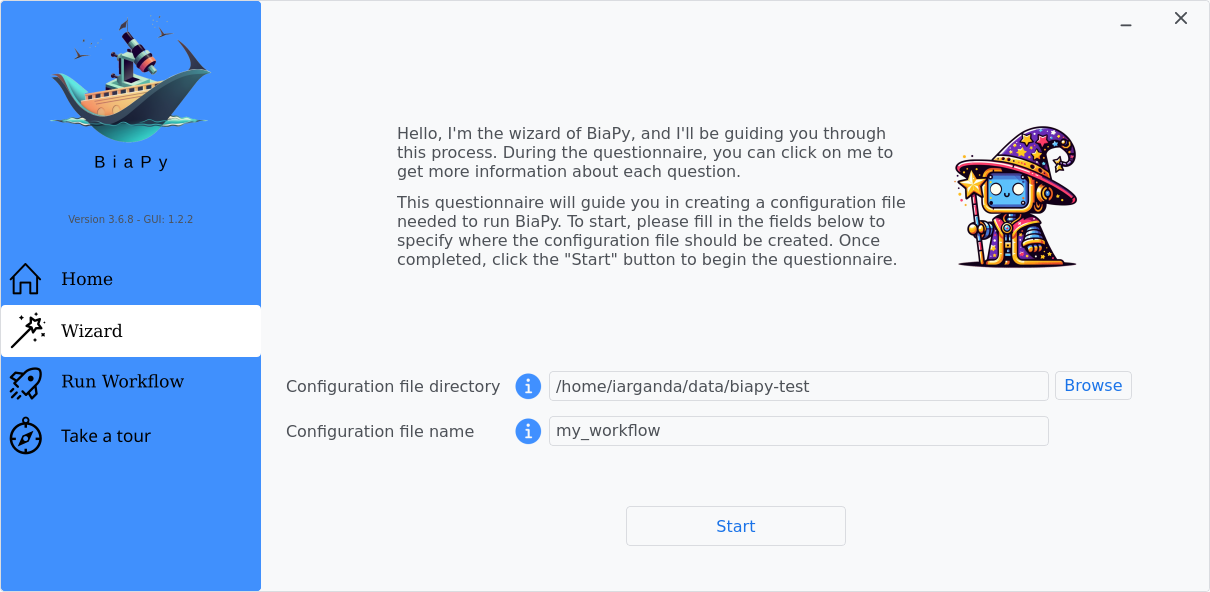
Step 1: Choose a folder and file name to store your workflow configuration file, then click "Start".
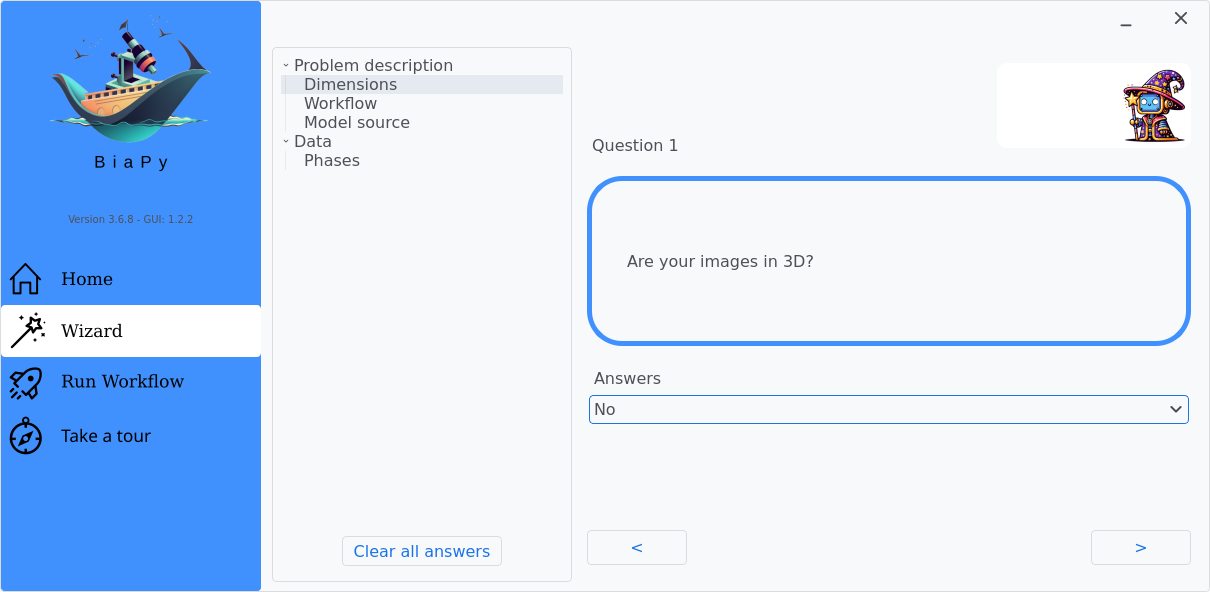
Step 2: Under Question 1, select the answer that best fits with your data dimensionality.
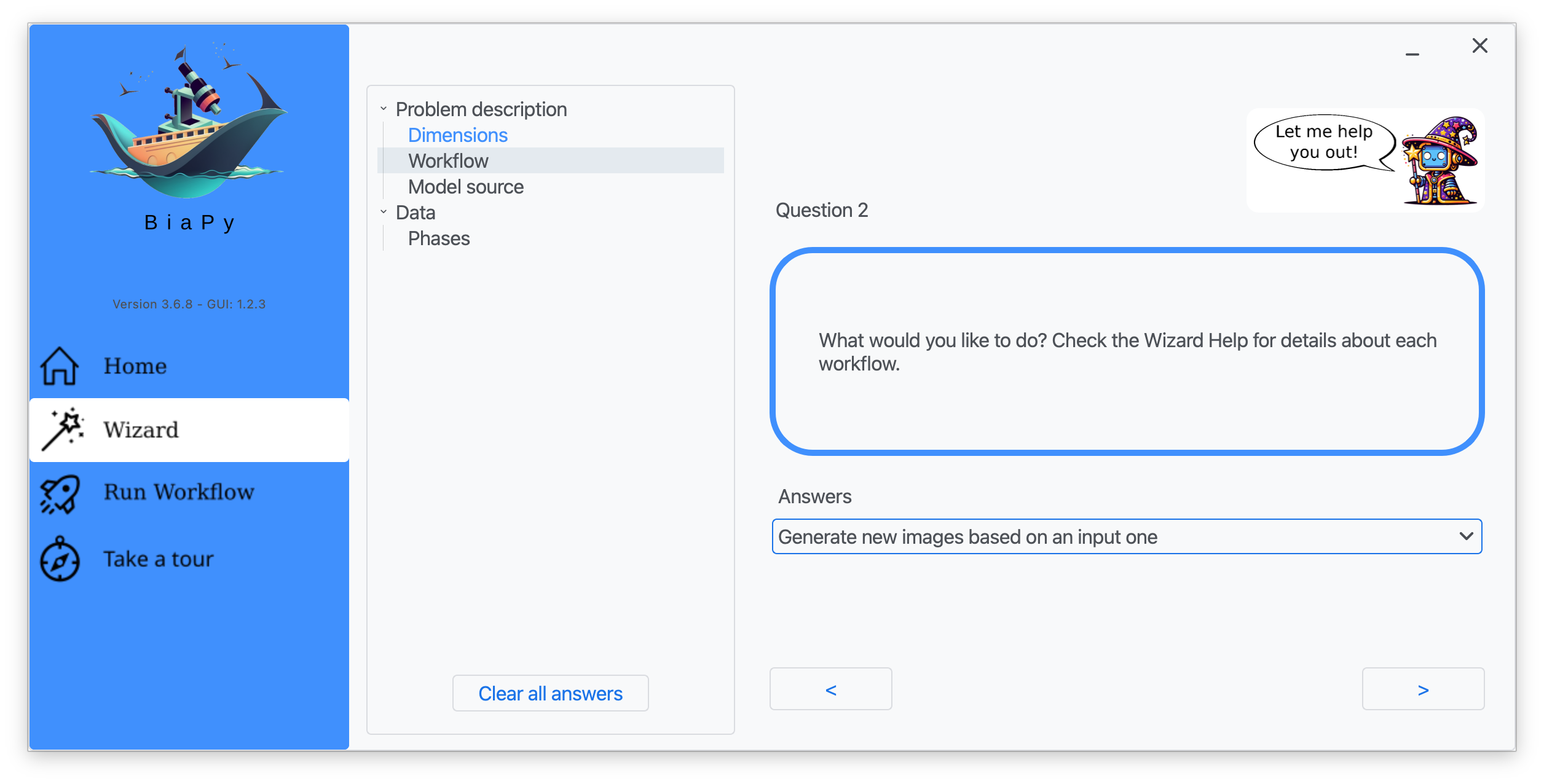
Step 3: Under Question 2, select the answer "Generate new images based on an input one".
After that, you will be able to edit the parameters of the workflow and run it.
Note
BiaPy’s GUI requires that all data and configuration files reside on the same machine where the GUI is being executed.
Tip
If you need additional help, watch BiaPy’s GUI walkthrough video.
BiaPy offers two code-free notebooks in Google Colab to perform image-to-image translation:
For 2D images:

For 3D images:
Tip
If you need additional help, watch BiaPy’s Notebook walkthrough video.
If you installed BiaPy via Docker, open a terminal as described in Installation. . Then, you can use the 2d_image-to-image.yaml template file (or your own file), and run the workflow as follows:
# Configuration file
job_cfg_file=/home/user/2d_image-to-image.yaml
# Path to the data directory
data_dir=/home/user/data
# Where the experiment output directory should be created
result_dir=/home/user/exp_results
# Just a name for the job
job_name=my_2d_image_to_image
# Number that should be increased when one need to run the same job multiple times (reproducibility)
job_counter=1
# Number of the GPU to run the job in (according to 'nvidia-smi' command)
gpu_number=0

docker run --rm \
    --gpus "device=$gpu_number" \
    --mount type=bind,source=$job_cfg_file,target=$job_cfg_file \
    --mount type=bind,source=$result_dir,target=$result_dir \
    --mount type=bind,source=$data_dir,target=$data_dir \
    biapyx/biapy:latest-11.8 \
        biapy \
        --config $job_cfg_file \
        --result_dir $result_dir \
        --name $job_name \
        --run_id $job_counter \
        --gpu "cuda:$gpu_number"
Note
Note that data_dir must contain all the paths DATA.*.PATH and DATA.*.GT_PATH so the container can find them. For instance, if you want to only train in this example DATA.TRAIN.PATH and DATA.TRAIN.GT_PATH could be /home/user/data/train/x and /home/user/data/train/y respectively.
For container versions prior to 3.6.8, the biapy prefix is not required. You can execute the command directly as follows:
docker run --rm \
    --gpus "device=$gpu_number" \
    --mount type=bind,source=$job_cfg_file,target=$job_cfg_file \
    --mount type=bind,source=$result_dir,target=$result_dir \
    --mount type=bind,source=$data_dir,target=$data_dir \
    biapyx/biapy:3.6.7-11.8 \
        --config $job_cfg_file \
        --result_dir $result_dir \
        --name $job_name \
        --run_id $job_counter \
        --gpu "$gpu_number"
From a terminal, you can use the 2d_image-to-image.yaml template file (or your own file), and run the workflow as follows:
# Configuration file
job_cfg_file=/home/user/2d_image-to-image.yaml
# Where the experiment output directory should be created
result_dir=/home/user/exp_results
# Just a name for the job
job_name=my_2d_image_to_image
# Number that should be increased when one need to run the same job multiple times (reproducibility)
job_counter=1
# Number of the GPU to run the job in (according to 'nvidia-smi' command)
gpu_number=0

# Load the environment
conda activate BiaPy_env

python -u main.py \
    --config $job_cfg_file \
    --result_dir $result_dir  \
    --name $job_name    \
    --run_id $job_counter  \
    --gpu "cuda:$gpu_number"
For multi-GPU training you can call BiaPy as follows:
# First check where is your biapy command (you need it in the below command)
# $ which biapy
# > /home/user/anaconda3/envs/BiaPy_env/bin/biapy

gpu_number="0, 1, 2"
python -u -m torch.distributed.run \
    --nproc_per_node=3 \
    /home/user/anaconda3/envs/BiaPy_env/bin/biapy \
    --config $job_cfg_file \
    --result_dir $result_dir  \
    --name $job_name    \
    --run_id $job_counter  \
    --gpu "cuda:$gpu_number"
nproc_per_node needs to be equal to the number of GPUs you are using (e.g. gpu_number length).
Templates
In the templates/image-to-image folder of BiaPy, you can find a few YAML configuration templates for this workflow.
[Advanced] Special workflow configuration
Note
This section is recommended for experienced users only to improve the performance of their workflows. When in doubt, do not hesitate to check our FAQ & Troubleshooting or open a question in the image.sc discussion forum.
Advanced Parameters
Many workflow-specific and general knobs can be tuned for image-to-image tasks. Below is a practical summary using the current options in config.py.
General tuning parameters (very useful in practice)
Model architecture (
MODEL.ARCHITECTURE): Backbone network. Current options for image-to-image areedsr,rcan,dfcan,wdsr,unet,resunet,resunet++,seunet,resunet_se,attention_unet,unetr,multiresunet,unext_v1,unext_v2,hrnetandstunet. Default:unet.Batch size (
TRAIN.BATCH_SIZE): Number of patches per optimization step. Increasing it can speed up training if memory allows; decreasing it lowers memory usage. Default:2.Patch size (
DATA.PATCH_SIZE): Patch shape used by the model. In 2D:(y, x, c). In 3D:(z, y, x, c). Default:(256, 256, 1).Optimizer (
TRAIN.OPTIMIZER): Optimizer algorithm. Options:SGD,ADAM,ADAMW. Default:["SGD"].Initial learning rate (
TRAIN.LR): Initial learning-rate value used by the optimizer. Default:[1e-4].Learning-rate scheduler (
TRAIN.LR_SCHEDULER.NAME): How the learning rate is adapted during training. Options:warmupcosine,reduceonplateau,onecycle,warmupreduceonplateau, or empty (disabled). Default:"".Test-time augmentation (TTA) (
TEST.AUGMENTATION): Enables prediction-time augmentation and fusion. Default:False. Related options areTEST.AUGMENTATION_MODE(mean,min,max; defaultmean) andTEST.AUGMENTATION_GROUP(auto/full,flips,none; defaultauto).
Image-to-image specific options
PROBLEM.IMAGE_TO_IMAGE.OUTPUT_CHANNELS: Number of channels to predict at the output. Default:1.PROBLEM.IMAGE_TO_IMAGE.OUTPUT_CHANNEL_ACT: Optional per-output-channel activation settings. Default:[].PROBLEM.IMAGE_TO_IMAGE.CHANNELS_PER_HEAD_INFO: Optional grouping of output channels into model heads. Default:[].PROBLEM.IMAGE_TO_IMAGE.SEPARATED_DECODERS_PER_HEAD: Use a separate decoder per output head when working with multi-head outputs. Default:False.PROBLEM.IMAGE_TO_IMAGE.MULTIPLE_RAW_ONE_TARGET_LOADER: Enable multi-input loaders when each sample has multiple raw inputs for one target. Default:False. Find an example in the LightMyCells tutorial.LOSS.TYPE: Image-to-image loss. Supported options includeMAE(automatic default when empty),MSE,SSIM,W_MAE_SSIMandW_MSE_SSIM. Default in config:""(automatic selection).
Metrics
During the inference phase, the performance of the test data is measured using different metrics if test masks were provided (i.e. ground truth) and, consequently, DATA.TEST.LOAD_GT is True. In the case of image-to-image the Peak signal-to-noise ratio (PSNR) metric is calculated when the target image is reconstructed from individual patches.
Results
The results are placed in results folder under --result_dir directory with the --name given. An example of this workflow is depicted below:

Predicted image. |

Target image. |
Following the example, you should see that the directory /home/user/exp_results/my_2d_image_to_image has been created. If the same experiment is run 5 times, varying --run_id argument only, you should find the following directory tree:
config_files: directory where the .yaml filed used in the experiment is stored.2d_image-to-image.yaml: YAML configuration file used (it will be overwrited every time the code is run)
checkpoints, optional: directory where model’s weights are stored. Only created whenTRAIN.ENABLEisTrueand the model is trained for at least one epoch.my_2d_image-to-image_1-checkpoint-best.pth, optional: checkpoint file (best in validation) where the model’s weights are stored among other information. Only created when the model is trained for at least one epoch.normalization_mean_value.npy, optional: normalization mean value. Is saved to not calculate it everytime and to use it in inference. Only created ifDATA.NORMALIZATION.TYPEiscustom.normalization_std_value.npy, optional: normalization std value. Is saved to not calculate it everytime and to use it in inference. Only created ifDATA.NORMALIZATION.TYPEiscustom.
results: directory where all the generated checks and results will be stored. There, one folder per each run are going to be placed. Can contain:my_2d_image_to_image_1: run 1 experiment folder. Can contain:aug, optional: image augmentation samples. Only created ifAUGMENTOR.AUG_SAMPLESisTrue.charts, optional. Only created whenTRAIN.ENABLEisTrueand epochs trained are more or equalLOG.CHART_CREATION_FREQ. Can contain:my_2d_image_to_image_1_*.png: plot of each metric used during training.my_2d_image_to_image_1_loss.png: loss over epochs plot.
per_image, optional: only created ifTEST.FULL_IMGisFalse. Can contain:.tif files: reconstructed images from patches..zarr files (or.h5), optional: reconstructed images from patches. Created whenTEST.BY_CHUNKS.ENABLEisTrue.
full_image, optional: only created ifTEST.FULL_IMGisTrue. Can contain:.tif files: full image predictions.
train_logs: each row represents a summary of each epoch stats. Only avaialable if training was done.tensorboard: tensorboard logs.test_results_metrics.csv: a CSV file containing all the evaluation metrics obtained on each file of the test set if ground truth was provided.
Note
Here, for visualization purposes, only my_2d_image_to_image_1 has been described but my_2d_image_to_image_2, my_2d_image_to_image_3, my_2d_image_to_image_4 and my_2d_image_to_image_5 will follow the same structure.