biapy.data.data_3D_manipulation
Module for 3D data manipulation utilities.
This module provides functions to process and manipulate 3D data volumes, including:
Cropping/merging with overlap
Padding and resizing
Efficient loading of large 3D files
- biapy.data.data_3D_manipulation.load_3D_efficient_files(data_path: List[str], input_axes: str, crop_shape: Tuple[int, ...], overlap: Tuple[float, ...], padding: Tuple[int, ...], check_channel: bool = True, data_within_zarr_path: str | None = None)[source]
Efficiently index 3D patches from Zarr or HDF5 image volumes for training or inference.
This function computes and returns metadata about all the 3D patches that can be extracted from a list of multidimensional microscopy volumes, typically stored in Zarr or HDF5 formats. Patches are extracted using overlap and padding strategies without loading full image volumes into memory, allowing large datasets to be preprocessed efficiently.
- Parameters:
data_path (list of str) – List of paths to Zarr or HDF5 files containing the raw 3D image volumes.
input_axes (str) – Axes layout of the image data in the files. Must be one of [‘TZCYX’, ‘TZYXC’, ‘ZCYX’, ‘ZYXC’].
crop_shape (tuple of int) – Shape of the 3D patches to be extracted, in the form (z, y, x, channels).
overlap (tuple of float) – Minimum fractional overlap between neighboring patches in the z, y, and x dimensions. Values must be in the range [0.0, 1.0).
padding (tuple of int) – Number of voxels to pad along each spatial axis (z, y, x) when patching.
check_channel (bool, optional) – If True, verify that the channel dimension in the crop_shape matches the actual number of channels in the image volume. Default is True.
data_within_zarr_path (str, optional) – Optional internal path to the dataset inside the Zarr or HDF5 file, e.g., ‘volumes/raw’ or ‘volumes/labels/neuron_ids’. If None, the top-level dataset is used.
- Returns:
data_info (dict) –
- Dictionary mapping patch index to patch metadata, with the following keys:
”filepath”: path to the source file.
”full_shape”: shape of the complete data volume.
”patch_coords”: coordinates (start and end) of the extracted patch.
data_info_total_patches (list of int) – List with the number of patches extracted from each file in data_path.
- Raises:
ValueError – If the input crop shape is not 4D or if the channel dimension does not match.
- biapy.data.data_3D_manipulation.load_img_part_from_efficient_file(filepath: str, patch_coords: PatchCoords, data_axes_order: str = 'ZYXC', data_path: str | None = None)[source]
Load from
filepaththe patch determined bypatch_coords.- Parameters:
filepath (str) – Path to the Zarr/H5 file to read the patch from.
patch_coords (list of PatchCoords) – Coordinates of the crop.
data_axes_order (str) – Order of axes of
data. E.g. ‘TZCYX’, ‘TZYXC’, ‘ZCYX’, ‘ZYXC’.data_path (str, optional) – Path to find the data within the Zarr file. E.g. ‘volumes.labels.neuron_ids’.
- Returns:
img – Extracted patch. E.g.
(z, y, x, channels).- Return type:
Numpy array
- biapy.data.data_3D_manipulation.extract_patch_from_efficient_file(data: Array | Dataset, patch_coords: PatchCoords, data_axes_order: str = 'ZYXC') ndarray[tuple[int, ...], dtype[_ScalarType_co]][source]
Load from
filepaththe patch determined bypatch_coords.- Parameters:
data (Zarr/H5 data) – Data to extract the patch from.
patch_coords (PatchCoords) – Coordinates of the crop.
data_axes_order (str) – Order of axes of
data. E.g. ‘TZCYX’, ‘TZYXC’, ‘ZCYX’, ‘ZYXC’.
- Returns:
img – Extracted patch. E.g.
(z, y, x, channels).- Return type:
Numpy array
- biapy.data.data_3D_manipulation.insert_patch_in_efficient_file(data: Array | Dataset, patch: ndarray[tuple[int, ...], dtype[_ScalarType_co]], patch_coords: PatchCoords, data_axes_order: str = 'ZYXC', patch_axes_order: str = 'ZYXC', mode='replace')[source]
Insert
patchindataatpatch_coords.- Parameters:
data (Zarr/H5 data) – Data to insert the patch into.
patch (NDArray) – Patch to insert into
data.patch_coords (PatchCoords) – Coordinates of the patch.
data_axes_order (str, optional) – Order of axes of
data. E.g. ‘TZCYX’, ‘TZYXC’, ‘ZCYX’, ‘ZYXC’.patch_axes_order (str, optional) – Order of axes of
patch. E.g. ‘TZCYX’, ‘TZYXC’, ‘ZCYX’, ‘ZYXC’.mode (str, optional) – What to do with the patch data when inserting it. Options: [“sum”, “replace”]
- biapy.data.data_3D_manipulation.crop_3D_data_with_overlap(data: ndarray[tuple[int, ...], dtype[_ScalarType_co]], vol_shape: Tuple[int, ...], data_mask: ndarray[tuple[int, ...], dtype[_ScalarType_co]] | None = None, overlap: Tuple[float, ...] = (0, 0, 0), padding: Tuple[int, ...] = (0, 0, 0), verbose: bool = True, median_padding: bool = False, load_data: bool = True) Tuple[ndarray[tuple[int, ...], dtype[_ScalarType_co]], ndarray[tuple[int, ...], dtype[_ScalarType_co]], List[PatchCoords]] | Tuple[ndarray[tuple[int, ...], dtype[_ScalarType_co]], List[PatchCoords]] | List[PatchCoords][source]
Crop 3D data into smaller volumes with a defined overlap. The opposite function is
merge_3D_data_with_overlap().- Parameters:
data (4D Numpy array) – Data to crop. E.g.
(z, y, x, channels).vol_shape (4D int tuple) – Shape of the volumes to create. E.g.
(z, y, x, channels).data_mask (4D Numpy array, optional) – Data mask to crop. E.g.
(z, y, x, channels).overlap (Tuple of 3 floats, optional) – Amount of minimum overlap on x, y and z dimensions. The values must be on range
[0, 1), that is,0%or99%of overlap. E.g.(z, y, x).padding (tuple of ints, optional) – Size of padding to be added on each axis
(z, y, x). E.g.(24, 24, 24).verbose (bool, optional) – To print information about the crop to be made.
median_padding (bool, optional) – If
Truethe padding value is the median value. IfFalse, the added values are zeroes.load_data (bool, optional) – Whether to create the patches or not. It saves memory in case you only need the coordiantes of the cropped patches.
- Returns:
cropped_data (5D Numpy array, optional) – Cropped image data. E.g.
(vol_number, z, y, x, channels). Returned ifload_dataisTrue.cropped_data_mask (5D Numpy array, optional) – Cropped image data masks. E.g.
(vol_number, z, y, x, channels). Returned ifload_dataisTrueanddata_maskis provided.crop_coords (list of dict) –
- Coordinates of each crop where the following keys are available:
"z_start": starting point of the patch in Z axis."z_end": end point of the patch in Z axis."y_start": starting point of the patch in Y axis."y_end": end point of the patch in Y axis."x_start": starting point of the patch in X axis."x_end": end point of the patch in X axis.
Examples
# EXAMPLE 1
# Following the example introduced in load_and_prepare_3D_data function, the cropping of a volume with shape
# (165, 1024, 765) should be done by the following call:
X_train = np.ones((165, 768, 1024, 1))
Y_train = np.ones((165, 768, 1024, 1))
X_train, Y_train = crop_3D_data_with_overlap(X_train, (80, 80, 80, 1), data_mask=Y_train,
                                             overlap=(0.5,0.5,0.5))
# The function will print the shape of the generated arrays. In this example:
#     **** New data shape is: (2600, 80, 80, 80, 1)
A visual explanation of the process:
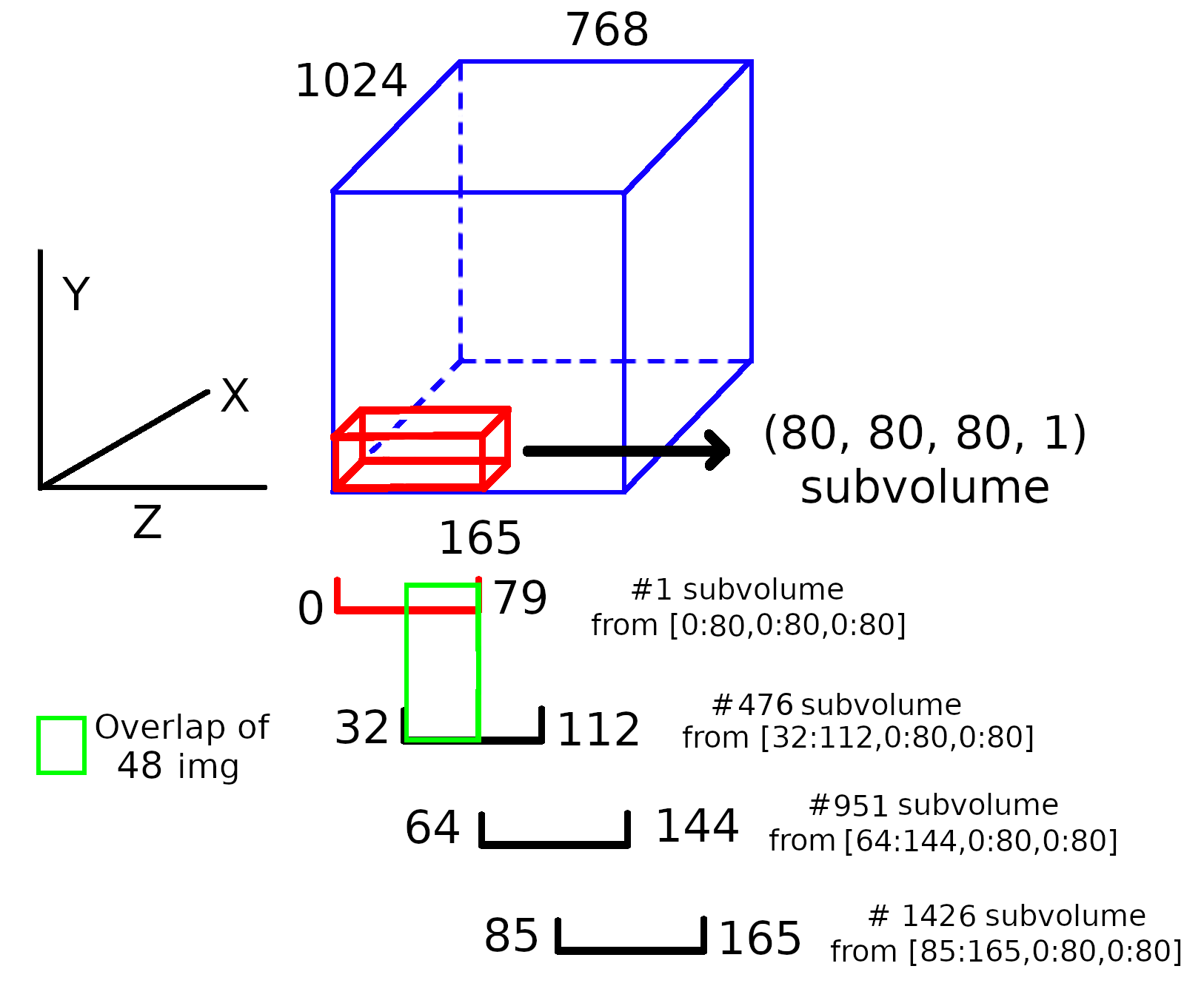
Note: this image do not respect the proportions.
# EXAMPLE 2
# Same data crop but without overlap

X_train, Y_train = crop_3D_data_with_overlap(X_train, (80, 80, 80, 1), data_mask=Y_train, overlap=(0,0,0))

# The function will print the shape of the generated arrays. In this example:
#     **** New data shape is: (390, 80, 80, 80, 1)
#
# Notice how differs the amount of subvolumes created compared to the first example

#EXAMPLE 2
#In the same way, if the addition of (64,64,64) padding is required, the call should be done as shown:
X_train, Y_train = crop_3D_data_with_overlap(
     X_train, (80, 80, 80, 1), data_mask=Y_train, overlap=(0.5,0.5,0.5), padding=(64,64,64))
- biapy.data.data_3D_manipulation.merge_3D_data_with_overlap(data: ndarray[tuple[int, ...], dtype[_ScalarType_co]], orig_vol_shape: Tuple, data_mask: ndarray[tuple[int, ...], dtype[_ScalarType_co]] | None = None, overlap: Tuple[float, ...] = (0, 0, 0), padding: Tuple[int, ...] = (0, 0, 0), verbose: bool = True) ndarray[tuple[int, ...], dtype[_ScalarType_co]] | Tuple[ndarray[tuple[int, ...], dtype[_ScalarType_co]], ndarray[tuple[int, ...], dtype[_ScalarType_co]] | None][source]
Merge 3D subvolumes in a 3D volume with a defined overlap.
The opposite function is
crop_3D_data_with_overlap().- Parameters:
data (5D Numpy array) – Data to crop. E.g.
(volume_number, z, y, x, channels).orig_vol_shape (4D int tuple) – Shape of the volumes to create.
data_mask (4D Numpy array, optional) – Data mask to crop. E.g.
(volume_number, z, y, x, channels).overlap (Tuple of 3 floats, optional) – Amount of minimum overlap on x, y and z dimensions. Should be the same as used in
crop_3D_data_with_overlap(). The values must be on range[0, 1), that is,0%or99%of overlap. E.g.(z, y, x).padding (tuple of ints, optional) – Size of padding to be added on each axis
(z, y, x). E.g.(24, 24, 24).verbose (bool, optional) – To print information about the crop to be made.
- Returns:
merged_data (4D Numpy array) – Cropped image data. E.g.
(z, y, x, channels).merged_data_mask (5D Numpy array, optional) – Cropped image data masks. E.g.
(z, y, x, channels).
- biapy.data.data_3D_manipulation.extract_3D_patch_with_overlap_and_padding_yield(data: Array | Dataset, vol_shape: Tuple[int, ...], axes_order: str, overlap: Tuple[float, ...] = (0, 0, 0), padding: Tuple[int, ...] = (0, 0, 0), total_ranks: int = 1, rank: int = 0, return_only_stats: bool = False, load_data: bool = True, verbose: bool = False)[source]
Extract 3D patches into smaller patches with a defined overlap.
Supports multi-GPU inference by setting
total_ranksandrankvariables. Each GPU will process an even number of volumes in theZaxis. If the number of volumes is not divisible by the number of GPUs, the first GPUs will process one more volume.- Parameters:
data (Zarr array or H5 dataset) – Data to extract patches from. E.g.
(z, y, x, channels).vol_shape (4D int tuple) – Shape of the patches to create. E.g.
(z, y, x, channels).axes_order (str) – Order of axes of
data. One of [‘TZCYX’, ‘TZYXC’, ‘ZCYX’, ‘ZYXC’].overlap (Tuple of 3 floats, optional) – Amount of minimum overlap on x, y and z dimensions. Should be the same as used in
crop_3D_data_with_overlap(). Values must be in range[0, 1), representing 0% to 99% overlap. E.g.(z, y, x).padding (tuple of ints, optional) – Size of padding to be added on each axis
(z, y, x). E.g.(24, 24, 24).total_ranks (int, optional) – Total number of GPUs.
rank (int, optional) – Rank of the current GPU.
return_only_stats (bool, optional) – Whether to just return crop statistics without yielding patches. Useful for precalculating the number of patches.
load_data (bool, optional) – Whether to load data from file. Speeds up process if only patch coordinates are needed.
verbose (bool, optional) – Whether to print debugging information.
- Yields:
img (4D Numpy array, optional) – Extracted patch from
data. E.g.(z, y, x, channels). Only returned ifload_dataisTrue.real_patch_in_data (Tuple of tuples of ints) – Coordinates where patch should be inserted in original data. E.g.
((0, 20), (0, 8), (16, 24))means the patch belongs at position [0:20,0:8,16:24] in the original data.total_vol (int) – Total number of crops to extract.
z_vol_info (dict, optional) – Mapping of volume positions in original data. E.g.
{0: [0, 20], 1: [20, 40]}means first volume goes at [0:20], second at [20:40].list_of_vols_in_z (list of list of int, optional) – Volumes assigned to each GPU. E.g.
[[0, 1, 2], [3, 4]]means GPU 0 processes volumes 0-2, GPU 1 processes volumes 3-4.
- biapy.data.data_3D_manipulation.order_dimensions(data: Sequence[slice] | List[int | str] | Tuple[int, ...] | ndarray[tuple[int, ...], dtype[_ScalarType_co]], input_order: str, output_order: str = 'TZCYX', default_value: int | float = 1) Sequence[slice] | List[int | str] | Tuple[int, ...] | ndarray[tuple[int, ...], dtype[_ScalarType_co]][source]
Reorder data from any input order to output order.
- Parameters:
data (Numpy array like) – data to reorder. E.g.
(z, y, x, channels).input_order (str) – Order of the input data. E.g.
ZYXC.output_order (str, optional) – Order of the output data. E.g.
TZCYX.default_value (int or float, optional) – Default value to use when a dimension is not present in the input order.
- Returns:
shape – Reordered data. E.g.
(t, z, channel, y, x).- Return type:
Tuple
- biapy.data.data_3D_manipulation.ensure_3d_shape(img: ndarray[tuple[int, ...], dtype[_ScalarType_co]], path: str | None = None, data_axes_order: str | None = None)[source]
Read an image from a given path.
- Parameters:
img (NDArray) – Image read.
path (str, optional) – Path of the image (just use to print possible errors).
data_axes_order (str, optional) – Order of axes of
data. E.g. ‘TZCYX’, ‘TZYXC’, ‘ZCYX’, ‘ZYXC’.
- Returns:
img – Image read. E.g.
(z, y, x, channels).- Return type:
Numpy 4D array
- biapy.data.data_3D_manipulation.read_chunked_nested_data(file: str, data_path: str = '') Tuple[Group | Array | File, Array | Dataset][source]
Find recursively raw and ground truth data within a H5/Zarr file.
This function automatically detects whether the input file is in HDF5 or Zarr format and returns the appropriate file handler and dataset objects.
- Parameters:
file (str) – Path to the input file. Supported formats: .h5, .hdf5, .hdf, .n5, .zarr
data_path (str, optional) – Internal path within the file where data is stored. Default: “” (root level)
- Returns:
Returns one of: - (zarr.Group, zarr.core.Array) for Zarr/N5 files - (h5py.File, h5py.Dataset) for HDF5 files
- Return type:
tuple
- Raises:
ValueError – If the input file format is neither Zarr nor HDF5
Examples
>>> file_handler, dataset = read_chunked_nested_data("data.h5")
>>> zarr_group, zarr_array = read_chunked_nested_data("data.zarr")
- biapy.data.data_3D_manipulation.read_chunked_nested_zarr(zarrfile: str, data_path: str = '') Tuple[Group, Array][source]
Find recursively raw and ground truth data within a Zarr/N5 file.
This function searches through a Zarr/N5 file hierarchy to locate array data at the specified path. It supports nested group structures.
- Parameters:
zarrfile (str) – Path to the Zarr/N5 file. Must have .zarr or .n5 extension.
data_path (str, optional) – Internal path to the dataset within the Zarr hierarchy, using dot notation for nested groups (e.g., “group1.subgroup.data”). Default: “” (root level).
- Returns:
A tuple containing: - zarr.Group: The root group of the Zarr file - zarr.core.Array: The found array data
- Return type:
tuple
- Raises:
ValueError – If the file extension is not .zarr or .n5 If the specified data_path is not found in the Zarr hierarchy
Examples
>>> group, array = read_chunked_nested_zarr("data.zarr")
>>> subgroup, dataset = read_chunked_nested_zarr("experiment.n5", "images.channel1")
- biapy.data.data_3D_manipulation.read_chunked_nested_h5(h5file: str, data_path: str = '') Tuple[File, Dataset][source]
Find recursively raw and ground truth data within an HDF5 file.
This function searches through an HDF5 file hierarchy to locate dataset objects at the specified path. It supports nested group structures.
- Parameters:
h5file (str) – Path to the HDF5 file. Must have .h5, .hdf5, or .hdf extension.
data_path (str, optional) – Internal path to the dataset within the HDF5 hierarchy, using dot notation for nested groups (e.g., “group1/subgroup/data”). Default: “” (root level).
- Returns:
A tuple containing: - h5py.File: The opened HDF5 file object - h5py.Dataset: The found dataset object
- Return type:
tuple
- Raises:
ValueError – If the file extension is not .h5, .hdf5, or .hdf If the specified data_path is not found in the HDF5 hierarchy
Examples
>>> file, dataset = read_chunked_nested_h5("data.h5")
>>> file, subgroup_data = read_chunked_nested_h5("experiment.hdf5", "images/channel1")
- biapy.data.data_3D_manipulation.read_chunked_data(filename: str) Tuple[Group | Array | File, Array | Dataset][source]
Read and return the first dataset found in an HDF5 or Zarr file.
This function automatically detects the file format (HDF5 or Zarr) and returns the file handler along with the first available dataset. For Zarr files, it prioritizes groups over arrays when multiple items exist.
- Parameters:
filename (str) – Path to the input file. Supported formats: - HDF5: .h5, .hdf5, .hdf - Zarr: .zarr
- Returns:
Returns one of: - (h5py.File, h5py.Dataset) for HDF5 files - (zarr.Group, zarr.Array) for Zarr files The first dataset found in the file will be returned
- Return type:
tuple
- Raises:
ValueError – If the file doesn’t exist If the file extension is not recognized If the input is not a string If no datasets are found in the file
Examples
>>> file_handler, dataset = read_chunked_data("data.h5")
>>> zarr_group, zarr_array = read_chunked_data("data.zarr")
Notes
For Zarr files, the function will: 1. First look for groups and return the first group found 2. If no groups exist, return the first array found
- biapy.data.data_3D_manipulation.looks_like_hdf5(path: str) bool[source]
Check if a given file path corresponds to an HDF5 file based on its extension.
- Parameters:
path (str) – The file path to check.
- Returns:
True if the file has an HDF5 extension, False otherwise.
- Return type:
bool
- biapy.data.data_3D_manipulation.pick_chunks(shape: Tuple[int, ...], dtype: str, target_mb: float = 4.0) Tuple[int, ...][source]
Pick chunk sizes for HDF5 datasets based on the shape and data type.
- Parameters:
shape (tuple of int) – Shape of the dataset.
dtype (str) – Data type of the dataset.
target_mb (float, optional) – Target chunk size in megabytes. Default is 4.0 MB.
- Returns:
Chunk sizes for each dimension of the dataset.
- Return type:
tuple of int
- biapy.data.data_3D_manipulation.load_synapse_gt_points(locations_path: str, resolution_path: str, partners_path: str, id_path: str, data_filename: str) Dict[str, list][source]
Load synapse ground truth points from the given paths.
- Parameters:
locations_path (str) – Path to the synapse locations within the data file.
resolution_path (str) – Path to the synapse resolution within the data file.
partners_path (str) – Path to the synapse partners within the data file.
id_path (str) – Path to the synapse ids within the data file.
data_filename (str) – Path to the data file.
- Returns:
gt_pre_points (list of numpy arrays) – List of pre-synaptic points coordinates.
gt_post_points (list of numpy arrays) – List of post-synaptic points coordinates.
gt_cleft_points (list of numpy arrays) – List of synaptic cleft points coordinates.
resolution (tuple of int or float) – Resolution of the synapse coordinates.